Ergonomic Book Stands & Desktop Copyholders: Relieve Neck Strain & Maximize Reading Pen Accuracy
Relieve neck strain and improve reading pen scanning accuracy with ergonomic desktop copyholders and adjustable book stands for thick textbooks and binders.
Why Desktop Ergonomics Matter for Intensive Reading and Assistive Pens
Direct Answer: Placing physical reading materials flat on a desk forces an unnatural forward neck tilt of 45 to 60 degrees, multiplying the cervical spine's gravitational load from 10-12 pounds to over 45-60 pounds ('text neck'), while causing optical scanning pens to tilt at improper angles that degrade OCR recognition accuracy.
When university students, legal researchers, medical professionals, or dyslexic adults read for hours, hunching over a flat desk leads to chronic trapezius tension, tension headaches, and shallow breathing that impairs cognitive concentration. Bringing physical text up to eye level using an adjustable desktop copyholder aligns the cervical vertebrae into neutral posture.
For users of optical reading pens like the Scanmarker Max or C-Pen Reader 2, an inclined book stand is not merely a comfort accessory—it is an essential operational tool that stabilizes paper planes and ensures consistent optical sensor contact.
The Reading Pen Scanning Angle Bottleneck: Why Flat Books Cause Scan Errors
Key Takeaway: Handheld optical reading pens require a steady 70° to 80° angle relative to the paper surface to maintain optical focus and steady guide-roller contact; flat, curled book pages cause the pen head to skip characters and misread word boundaries.
When reading a 500-page bound textbook laid flat on a desk:
Page Gutter Curvature: The spine curvature causes lines near the center gutter to slope downward by 15 to 30 degrees, causing the pen's optical sensor to lose alignment midway through a sentence.
Hand & Wrist Fatigue: Maintaining a perpendicular pen angle over a flat surface forces extreme wrist flexion (ulnar deviation), leading to carpal tunnel strain during long study sessions.
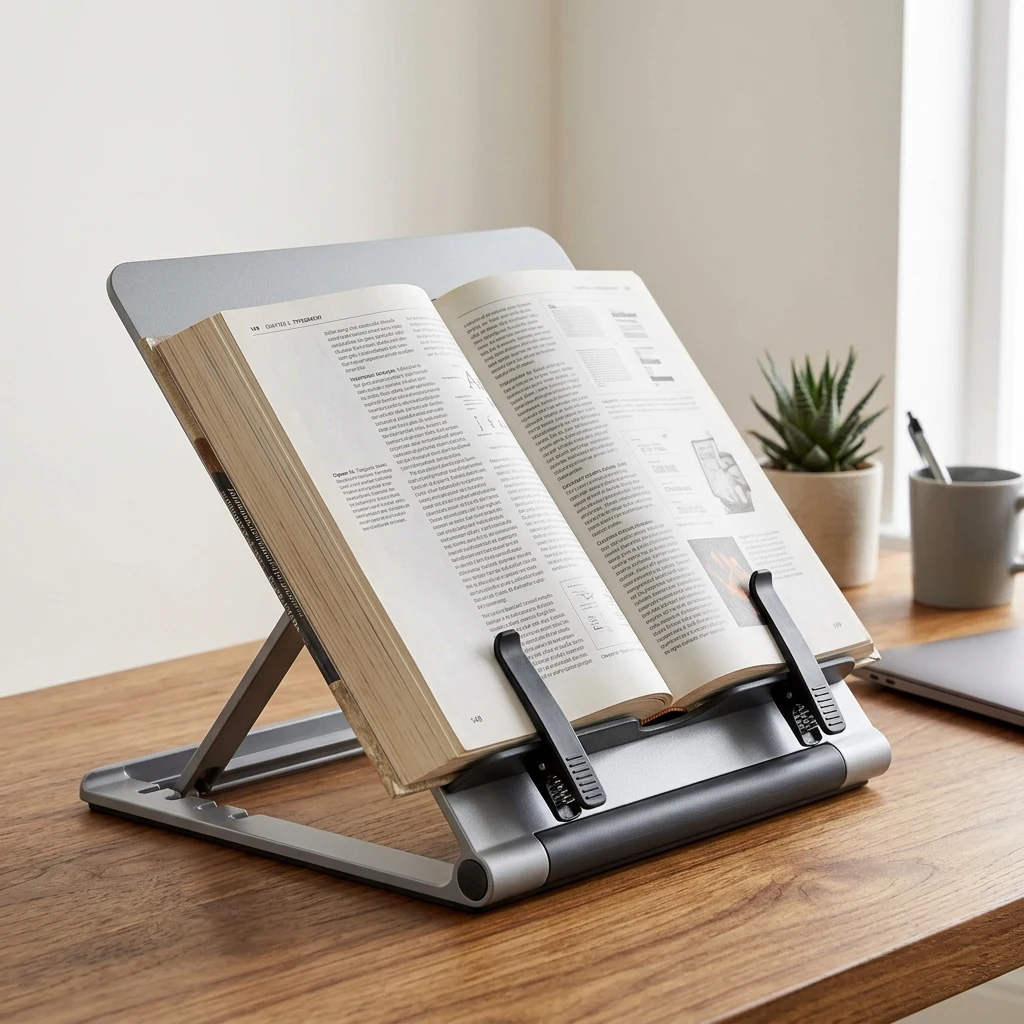
The Copyholder Advantage: Resting the book on an inclined stand like the Fellowes BookLift Ergonomic Copyholder flattens the page surface toward your natural hand posture, allowing the pen wand to glide smoothly across each line with minimal wrist effort and near-zero scanning errors.
Heavy Hardcovers, Legal Manuals, and Spiral Binders: Spring-Loaded Page Clips
Mechanical Stability: Cheap wire book stands frequently tip over or collapse under the weight of heavy medical treatises, engineering handbooks, or 3-ring district binders. The Fellowes BookLift is specifically engineered for high-weight academic volumes.
Key engineering highlights for serious readers include:
Heavy-Duty Spring-Loaded Page Clips: Securely hold open signatures of books up to 400 pages (over 1.5 inches thick) without snapping shut or creasing delicate paper leaves.
Dual-Axis Angle Adjustment: Features 9 distinct height and tilt adjustment slots, ranging from a steep 75-degree display angle for seated typing to a gentle 25-degree incline for active pen scanning and annotation.
Fold-Flat Portability: Collapses completely flat to slip into standard student backpacks, messenger bags, or office briefcase compartments alongside a laptop.
Desktop Book Stands Compared: Wire Easels vs. Wooden Stands vs. Heavy Copyholders
Evaluating common book holder architectures across everyday reading and scanning requirements:
| Stand Architecture | Weight Capacity | Page Restraint System | Pen Scanning Stability | Portability Factor |
|---|---|---|---|---|
| Heavy Copyholder (Fellowes BookLift) | Up to 10 lbs (Thick hardcovers & binders) | Spring-loaded dual page clips | Maximum (Rigid non-slip ABS frame) | Folds completely flat (High) |
| Wooden Bamboo Reading Stand | Up to 6 lbs (Standard paperbacks) | Thin metal spring fingers | Moderate (Wood base can slide) | Bulky & heavy to transport |
| Basic Wire Book Easel | Under 2 lbs (Thin magazines only) | None (Pages spring shut easily) | Poor (Tips over under pen pressure) | Very lightweight but flimsy |
| Articulated Metal Desk Arm | Up to 8 lbs (Suspended in air) | Clamping brackets | Poor (Bounces and wobbles during scanning) | Fixed clamp (Zero portability) |
Creating an Ergonomic Study Station: Aligning Document, Screen, and Lighting
Workstation Geometry: Professional ergonomists recommend arranging study desks into the 'Ergonomic Study Triangle' to eliminate neck rotation and eye re-focusing latency:
1. Direct Center Alignment: Place your physical book holder directly between your keyboard and your computer monitor, or immediately adjacent at the same height and distance as your display screen.
2. Eliminating Cervical Rotation: When transcribing quotes or scanning notes from paper into a computer, keeping the book holder adjacent to the screen prevents the neck from constantly twisting side-to-side (a primary cause of occupational cervical spasms).
3. Lighting Geometry: Position your desk lamp at a 45-degree angle to the side of the copyholder to prevent glare reflections off glossy textbook pages from bouncing directly into your eyes.
Checklist: How to Select the Optimal Book Stand for Your Study Needs
Before purchasing a desk copyholder, verify these critical features:
Deep Page Shelf: Ensure the front ledge is at least 1.25 inches deep to accommodate thick reference volumes without pages sliding over the lip.
Independent Page Clips: Look for spring-loaded clips that allow single-handed page turning without having to unclamp the entire book.
Non-Skid Rubber Base: Rubberized footing prevents the stand from sliding backward when pressing a handheld scanner wand against the paper.
Universal Document Support: Compatible with bound books, spiral workbooks, legal pads, and loose-leaf ring binders.
FAQ
Why is an ergonomic book stand recommended when using a scanning reader pen?
An optical reading pen requires a consistent 70° to 80° angle relative to the paper surface and firm, steady guide-roller contact. When books lie flat, the gutter curves downward, causing scan errors, and your wrist suffers from awkward flexion. An ergonomic book stand angles the page toward your natural hand posture, stabilizing the text line and ensuring flawless OCR scanning.
Can the Fellowes BookLift hold very thick medical textbooks or 3-ring binders?
Yes. The Fellowes BookLift Ergonomic Copyholder features heavy-duty spring-loaded clips and a wide ledge engineered specifically for thick academic hardcovers, medical reference manuals, law casebooks, and standard 3-ring binders up to 400 pages thick.
How does an eye-level book holder reduce neck strain and headaches?
Looking down at a flat desk angles the human head forward by 45 to 60 degrees, which increases the gravitational load on the cervical spine from 12 pounds to over 45 pounds. Elevating reading materials to eye level maintains neutral spine alignment, eliminating chronic trapezius muscle spasms, tension headaches, and reading fatigue.
Is the Fellowes BookLift portable enough to carry to a college library or office?
Yes. The BookLift features an integrated multi-slot easel mechanism that collapses completely flat into a slim profile under 1.5 inches thick, making it easy to slide into a student backpack, briefcase, or tote bag alongside a laptop.
What is the optimal angle to set an ergonomic book stand for reading?
For passive long-form reading, an angle between 60° and 70° relative to the desk surface aligns text perpendicular to your natural line of sight. For active optical pen scanning and note-taking, a lower angle between 30° and 45° provides the ideal balance between posture support and steady downward hand pressure.
Does using a book stand interfere with handwriting or taking notes in margins?
No. Adjusting the stand to one of its lower incline angles (such as 25° or 35°) creates an ergonomic drafting slope that is actually more comfortable for hand annotation and highlighting than writing on a completely flat desk.
Related guides
Reading Long-Form Books with Assistive Technology
Overcoming Ocular Reading Fatigue & Neck Strain
Important: Information in this guide is provided for general purposes and is not a substitute for professional medical, vision, or accessibility advice. A reading pen is an assistive tool that provides access to printed text — it does not diagnose, treat, or correct any reading, vision, or attention-related condition. Last reviewed: August 2026.
← All 37 guides