Handheld Video Magnifiers for Low Vision & Macular Degeneration: The Complete Guide (2026)
Compare digital video magnifiers for macular degeneration, glaucoma, and low vision. Discover 4X-32X zoom, 17 high-contrast modes, and freeze-frame reading.
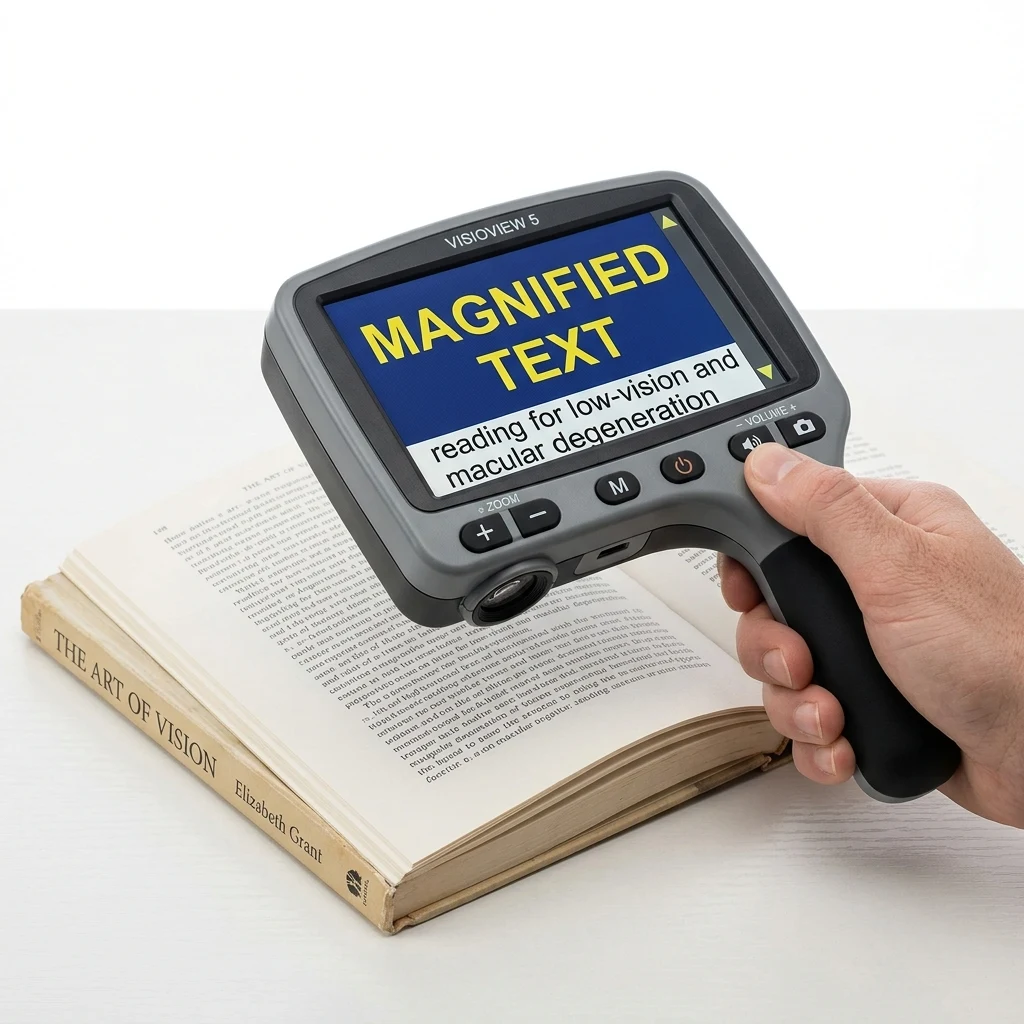
What Is a Handheld Digital Video Magnifier and How Does It Work?
Direct Answer: A handheld digital video magnifier (also known as an electronic low-vision aid or portable CCTV) uses an HD optical sensor, an adjustable focal lens, and an integrated color LCD screen (typically 4.3 to 5 inches) to magnify physical text from 4X up to 32X, while offering high-contrast color remapping and freeze-frame functionality.
Unlike traditional convex glass magnifying glasses that require holding an exact focal distance with steady hands, a digital video magnifier rests directly on top of the reading material or glides smoothly along lines using integrated roller glides. As optical magnifiers increase in power beyond 4X or 5X, the physical lens diameter must shrink dramatically, creating optical spherical distortion and forcing the user into a pinhole-sized field of view.
Electronic video magnifiers eliminate this optical bottleneck completely. The device captures a live digital video feed of the printed page, processes the visual signal through a dedicated DSP chip in milliseconds, and outputs a crystal-clear, distortion-free image onto a vibrant LCD screen. This enables individuals with central vision loss to read standard-size books, morning mail, financial statements, and food packaging without ocular strain.
Critical Features: Why 17 High-Contrast Modes Matter for Macular Degeneration
Key Takeaway: For adults with age-related macular degeneration (AMD) or diabetic retinopathy, loss of contrast sensitivity is often far more debilitating than loss of visual acuity; electronic high-contrast color remapping restores letter-edge recognition that optical lenses cannot achieve.
When reading ink on newsprint or grey paper, degraded photoreceptor cells struggle to separate black typography from off-white backgrounds. Dedicated digital magnifiers like the Eyoyo 5" Handheld Video Magnifier address this by converting greyscale optical inputs into 17 distinct high-contrast synthetic color modes:
White on Black (Inverted Mode): Significantly reduces blinding screen glare and ocular photophobia by displaying crisp white characters against a completely dark background, easing reading for retinitis pigmentosa and cataract patients.
Yellow on Black & Yellow on Blue: Enhances chromatic edge contrast specifically calibrated for human cone photoreceptors, providing superior legibility for readers suffering from geographic atrophy.
Black on Yellow & Blue on Yellow: Amplifies perceptual brightness in dimly lit environments such as restaurants, bedside reading, or conference rooms.
Full True-Color Mode: Allows natural color viewing for inspecting color family photographs, stamps, artwork, maps, and medication blister packs.
Freeze-Frame Technology: Safely Inspecting Medicine Bottles, Serial Numbers, and Mail
Practical Advantage: Freeze-frame functionality allows low-vision readers to hover the device over curved, awkward, or poorly illuminated objects—such as prescription medicine bottles, appliance serial stickers, or high grocery shelf price tags—press the snapshot button, and bring the frozen image comfortably up to eye level.
Daily independent living involves reading physical typography that cannot be laid flat on a desk. Attempting to hold a heavy glass magnifier and rotate a round prescription bottle simultaneously is a common source of frustration and medication dosage errors for seniors.
With an electronic freeze-frame aid:
1. Point the camera at the medication dosage instructions or expiration date.
2. Tap the dedicated freeze-frame shutter button to capture the high-resolution frame.
3. Bring the lightweight 5-inch unit directly to your comfortable viewing distance, zoom in up to 32X, toggle color contrast modes, and review the instructions with absolute peace of mind.
Digital Video Magnifiers vs. Optical Magnifiers vs. Standalone Reading Pens
Low-vision hardware spans optical, video, and text-to-speech modalities depending on whether the reader retains usable visual acuity or requires auditory conversion:
| Accessibility Tool | Core Mechanism | Magnification Power | Audio / TTS Support | Best Everyday Application |
|---|---|---|---|---|
| Handheld Video Magnifier (Eyoyo 5") | HD Camera + 5" LCD Display | 4X to 32X Smooth Zoom | No (Pure visual enlargement) | Medicine bottles, mail, labels, crosswords & short reading |
| Standalone Reading Pen (Scanmarker Max) | Handheld Optical Sensor + DSP | Visual text on screen + Audio | Yes (Instant offline TTS speech) | Dense books, multi-page documents & severe vision fatigue |
| Optical Glass Magnifier | Convex Biconvex Glass Lens | 2X to 5X Maximum | No (Pure optical refraction) | Quick inspection of single stamps, coins, or large print |
| Desktop CCTV Video System | Heavy 24" Fixed Arm Monitor | 2X to 70X Motorized Zoom | Optional on premium models | Dedicated home desk reading for full newspapers & books |
Ergonomics, Battery Life, and TV / Monitor Video Output
Hardware Usability: Modern portable electronic magnifiers weigh under 250 grams (8.8 ounces) and feature foldable kickstands designed to maintain the optimal 15-degree focal tilt across flat books without requiring hand strain.
Key ergonomic factors for older readers and accessibility professionals include:
Continuous Runtime: Integrated rechargeable lithium batteries provide 3.5 to 4.5 hours of continuous illumination and display, with standard USB charging compatible with common phone wall chargers.
AV / HDMI Television Output: The Eyoyo 5" Handheld Video Magnifier includes video-out connectivity that mirrors the magnified image onto any standard 32" to 65" living room television screen, transforming a portable travel unit into a full desktop CCTV reading system at zero extra cost.
Physical Tactile Buttons: High-contrast raised buttons allow seniors with peripheral neuropathy or arthritic fingers to adjust zoom, color modes, and freeze-frame without hunting through complex software touch menus.
How to Choose the Right Low-Vision Magnifier for Your Visual Condition
Selecting an effective reading aid depends on your specific ophthalmological profile:
1. Macular Degeneration (Dry or Wet AMD): A 5-inch handheld video magnifier with Yellow-on-Black or White-on-Black modes is the primary visual recommendation, as it overcomes the central retinal blind spot (scotoma) by enlarging letters into your functioning peripheral retina.
2. Glaucoma (Constricted Field / Tunnel Vision): Optical reading pens like the Scanmarker Max that translate printed lines into clear speech are frequently superior to extreme magnification, because high magnification reduces the number of characters visible within a constricted field.
3. Diabetic Retinopathy & Floaters: High-contrast mode toggling dramatically improves word boundary recognition through patchy or fluctuating vitreous clarity.
4. General Presbyopia & Senior Reading Fatigue: A portable 5" video magnifier provides instant relief for reading fine-print restaurant menus, utility bills, and packaging labels without needing multiple pairs of reading glasses.
FAQ
What is the difference between an optical magnifying glass and a digital video magnifier?
An optical magnifying glass uses a physical convex glass lens to bend light, which causes severe edge distortion, narrow focal range, and dark shadows at powers above 4X. A digital video magnifier uses an HD digital camera, LED illumination, and an LCD screen to display sharp, glare-free magnification up to 32X with 17 high-contrast color modes and freeze-frame snapshot capabilities.
Can a handheld video magnifier help someone with advanced age-related macular degeneration (AMD)?
Yes. Macular degeneration damages central vision while sparing peripheral vision. A digital video magnifier enlarges printed letters large enough that they fall across undamaged peripheral photoreceptors, while high-contrast modes (like white text on black background) restore critical edge contrast that optical lenses cannot provide.
Does the Eyoyo 5" handheld video magnifier read the words aloud with text-to-speech?
No. The Eyoyo 5" Handheld Video Magnifier is a dedicated visual enhancement device that magnifies text and alters color contrast on screen; it does not contain an optical character recognition (OCR) engine or text-to-speech speaker. If you require spoken auditory reading assistance for printed pages, pair it with a standalone reading pen like the Scanmarker Max.
How does the freeze-frame button work on portable video magnifiers?
The freeze-frame button functions like a digital camera snapshot. When you aim the camera at an awkward or curved object—such as a round prescription medicine bottle or a wall thermostat—pressing the freeze button locks the still image onto the 5" screen. You can then bring the device comfortably up to your eyes, zoom in up to 32X, and change contrast modes without holding the physical object.
Can portable video magnifiers connect to a television or external computer monitor?
Yes. Models like the Eyoyo 5" include an AV/TV-out cable in the box. Plugging the device into your television's video input displays the live magnified text across your entire television screen, effectively providing a large-format desktop CCTV magnifier at a fraction of the cost.
Are handheld digital video magnifiers permitted on airplanes and in medical facilities?
Yes. Handheld electronic magnifiers contain rechargeable lithium batteries similar to mobile phones and are fully approved as assistive medical devices by the TSA, FAA, and hospital clinics for carry-on luggage and personal use.
Related guides
Reading Tools for Seniors & Low Vision
Reading Small Print: Labels, Menus & Medicine Bottles
Important: Information in this guide is provided for general purposes and is not a substitute for professional medical, vision, or accessibility advice. A reading pen is an assistive tool that provides access to printed text — it does not diagnose, treat, or correct any reading, vision, or attention-related condition. Last reviewed: August 2026.
← All 37 guides